
claude-squad

by smtg-aiVerified

Manage multiple AI terminal agents like Claude Code, Codex, OpenCode, and Amp.

8,354
Stars
611
Forks
Go
Language
8/23/2026
Added
View on GitHubDownload ZIP

⚠️ Third-Party Software Notice

This skill is third-party open-source software developed and hosted independently on GitHub. SkillTip is an informational directory and does not control or maintain the underlying repository. Any security checks displayed are automated and limited in scope. Review the source code before installing.

Read the Terms of Service

Installation

Add to your Claude Code skills directory:

# Add to your Claude Code skills
git clone https://github.com/smtg-ai/claude-squad

Getting Started

Guides for using skills like claude-squad.

Security Report

Verified

Last scanned: —

{
  "status": "PASSED",
  "issues": []
}

README.md

Claude Squad CI GitHub Release

Claude Squad is a terminal app that manages multiple Claude Code, Codex, Gemini (and other local agents including Aider) in separate workspaces, allowing you to work on multiple tasks simultaneously.
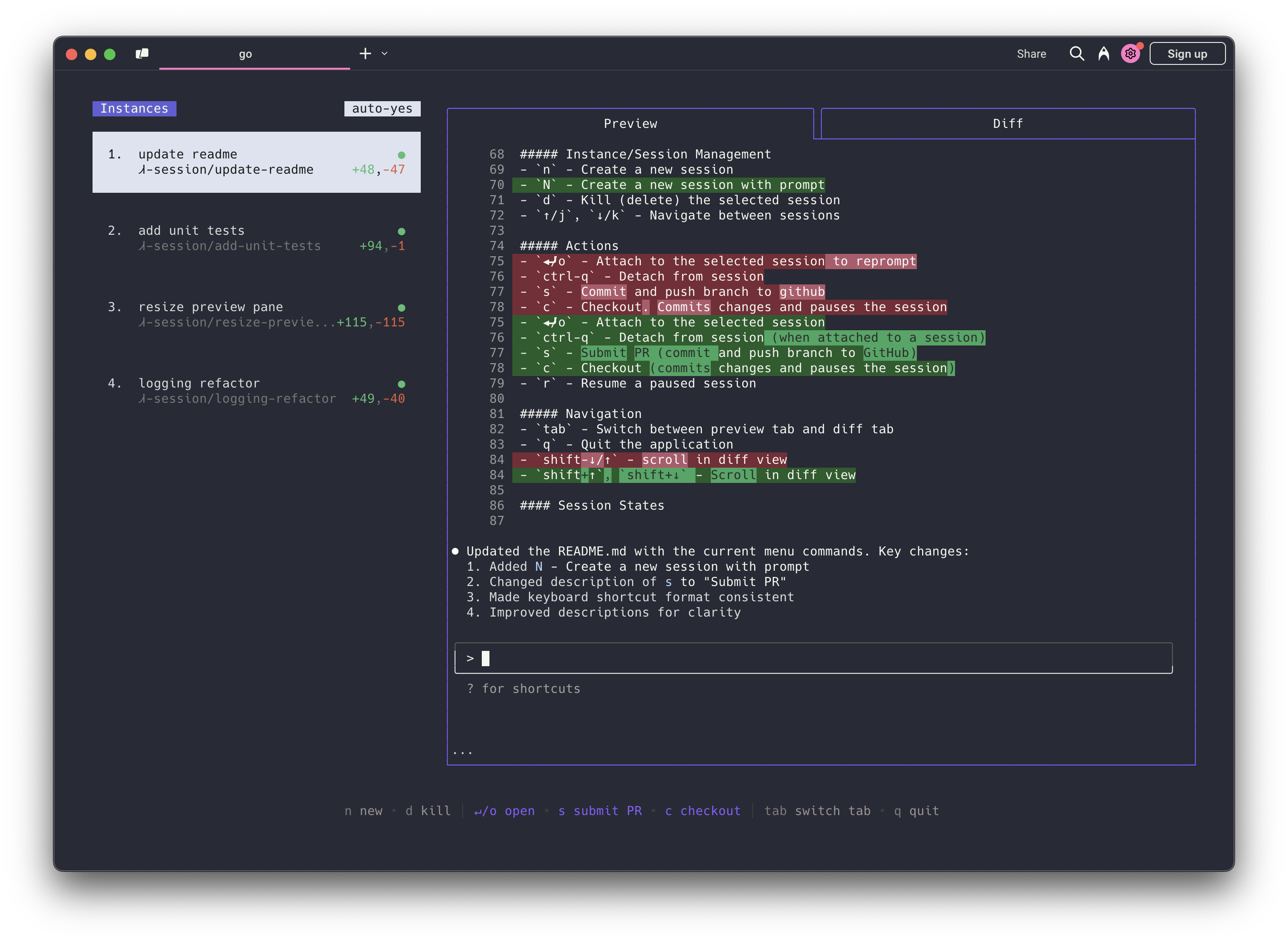
Claude Squad Screenshot

Highlights

  • Complete tasks in the background (including yolo / auto-accept mode!)
  • Manage instances and tasks in one terminal window
  • Review changes before applying them, checkout changes before pushing them
  • Each task gets its own isolated git workspace, so no conflicts

https://github.com/user-attachments/assets/aef18253-e58f-4525-9032-f5a3d66c975a


Installation

Both Homebrew and manual installation will install Claude Squad as cs on your system.

Homebrew

brew install claude-squad
ln -s "$(brew --prefix)/bin/claude-squad" "$(brew --prefix)/bin/cs"

Manual

Claude Squad can also be installed by running the following command:

curl -fsSL https://raw.githubusercontent.com/smtg-ai/claude-squad/main/install.sh | bash

This puts the cs binary in ~/.local/bin.

To use a custom name for the binary:

curl -fsSL https://raw.githubusercontent.com/smtg-ai/claude-squad/main/install.sh | bash -s -- --name <your-binary-name>

Prerequisites

Usage

Usage:
  cs [flags]
  cs [command]

Available Commands:
  completion  Generate the autocompletion script for the specified shell
  debug       Print debug information like config paths
  help        Help about any command
  reset       Reset all stored instances
  version     Print the version number of claude-squad

Flags:
  -y, --autoyes          [experimental] If enabled, all instances will automatically accept prompts for claude code & aider
  -h, --help             help for claude-squad
  -p, --program string   Program to run in new instances (e.g. 'aider --model ollama_chat/gemma3:1b')

Run the application with:

cs

NOTE: The default program is claude and we recommend using the latest version.


Using Claude Squad with other AI assistants:

  • For Codex: Set your API key with export OPENAI_API_KEY=<your_key>
  • Launch with specific assistants:
    • Codex: cs -p "codex"
    • Aider: cs -p "aider ..."
    • Gemini: cs -p "gemini"
  • Make this the default, by modifying the config file (locate with cs debug)

Menu

The menu at the bottom of the screen shows available commands:

Instance/Session Management
  • n - Create a new session
  • N - Create a new session with a prompt
  • D - Kill (delete) the selected session
  • ↑/j, ↓/k - Navigate between sessions
Actions
  • ↵/o - Attach to the selected session to reprompt
  • ctrl-q - Detach from session
  • s - Commit and push branch to github
  • c - Checkout. Commits changes and pauses the session
  • r - Resume a paused session
  • ? - Show help menu
Navigation
  • tab - Switch between preview tab and diff tab
  • q - Quit the application
  • shift-↓/↑ - scroll in diff view

Configuration

Claude Squad stores its configuration in ~/.claude-squad/config.json. You can find the exact path by running cs debug.

Profiles

Profiles let you define multiple named program configurations and switch between them when creating a new session. When more than one profile is defined, the session creation overlay shows a profile picker that you can navigate with /.

To configure profiles, add a profiles array to your config file and set default_program to the name of the profile to select by default:

{
  "default_program": "claude",
  "profiles": [
    { "name": "claude", "program": "claude" },
    { "name": "codex", "program": "codex" },
    { "name": "aider", "program": "aider --model ollama_chat/gemma3:1b" }
  ]
}

Each profile has two fields:

FieldDescription
nameDisplay name shown in the profile picker
programShell command used to launch the agent for that profile

If no profiles are defined, Claude Squad uses default_program directly as the launch command (the default is claude).

FAQs

Failed to start new session

If you get an error like failed to start new session: timed out waiting for tmux session, update the underlying program (ex. claude) to the latest version.

How It Works

  1. tmux to create isolated terminal sessions for each agent
  2. git worktrees to isolate codebases so each session works on its own branch
  3. A simple TUI interface for easy navigation and management

License

AGPL-3.0

Star History

Star History Chart

Frequently Asked Questions

What is claude-squad?

claude-squad is an open-source ai agents skill for AI coding assistants such as Claude Code, Codex CLI, and ChatGPT, built by smtg-ai. Manage multiple AI terminal agents like Claude Code, Codex, OpenCode, and Amp. It has 8,354 GitHub stars.

Is claude-squad safe to use?

Yes. claude-squad passed SkillsLLM's automated security scan — a dependency vulnerability audit plus prompt-injection heuristics — with no high-severity issues. You can read the full report in the Security Report section on this page.

How do I install claude-squad?

Clone the repository with "git clone https://github.com/smtg-ai/claude-squad" and add it to your Claude Code skills directory (see the Installation section above).

What programming language is claude-squad written in?

claude-squad is primarily written in Go. It is open-source under smtg-ai on GitHub, so you can review or fork the full source.

Are there alternatives to claude-squad?

Yes. SkillsLLM lists many other AI Agents skills you can browse and compare side by side. Open the AI Agents category from the badge at the top of this page, or use the Related Skills and comparison links further down to weigh claude-squad against similar tools.

Comments (0)

No comments yet. Be the first to share your thoughts!

ECC

by affaan-m

10

The agent harness performance optimization system. Skills, instincts, memory, security, and research-first development for Claude Code, Codex, Opencode, Cursor and beyond.

242,21936,702JavaScript
AI Agentsai-agentsanthropicclaude-code
View details
15

An agentic skills framework & software development methodology that works.

234,96620,863Shell
AI Agentsai-agentsbrainstorming
View details

The agent harness performance optimization system. Skills, instincts, memory, security, and research-first development for Claude Code, Codex, Opencode, Cursor and beyond.

185,94028,768JavaScript
AI Agentsai-agentsanthropicclaude-code
View details

cc-switch

by farion1231

3

A cross-platform desktop All-in-One assistant for Claude Code, Codex, OpenCode, OpenClaw, Grok Build & Hermes Agent. Only official website: ccswitch.io

128,8688,826Rust
AI Agentsclaude-codeai-tools
View details

claude-code

by anthropics

Claude Code is an agentic coding tool that lives in your terminal, understands your codebase, and helps you code faster by executing routine tasks, explaining complex code, and handling git workflows - all through natural language commands.

120,03119,897Shell
AI Agents
View details

Developers Also Liked

Based on votes and bookmarks from developers who liked this skill

ECC

by affaan-m

10

The agent harness performance optimization system. Skills, instincts, memory, security, and research-first development for Claude Code, Codex, Opencode, Cursor and beyond.

242,21936,702JavaScript
AI Agentsai-agentsanthropicclaude-code
View details
15

An agentic skills framework & software development methodology that works.

234,96620,863Shell
AI Agentsai-agentsbrainstorming
View details

n8n

by n8n-io

12

Fair-code workflow automation platform with native AI capabilities. Combine visual building with custom code, self-host or cloud, 400+ integrations.

201,88160,308TypeScript
MCP Serversapisai-tools
View details

The agent harness performance optimization system. Skills, instincts, memory, security, and research-first development for Claude Code, Codex, Opencode, Cursor and beyond.

185,94028,768JavaScript
AI Agentsai-agentsanthropicclaude-code
View details

cc-switch

by farion1231

3

A cross-platform desktop All-in-One assistant for Claude Code, Codex, OpenCode, OpenClaw, Grok Build & Hermes Agent. Only official website: ccswitch.io

128,8688,826Rust
AI Agentsclaude-codeai-tools
View details