Lazy MCP
Lazy MCP lets your agent fetch MCP tools only on demand, saving those tokens from polluting your context window.
In this example, it saved 17% (34,000 tokens) of an entire claude code context window by hiding 2 MCP tools that aren't always needed.
Welcoming open source contributions!
How it Works
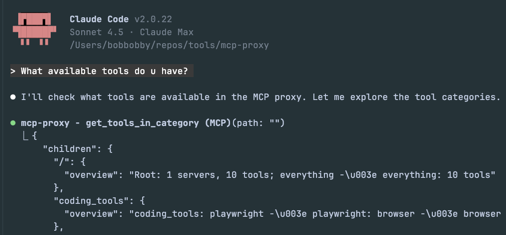
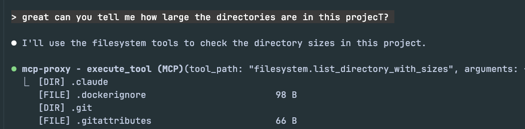
Lazy MCP exposes two meta tools, which allows agents to explore a tree structure of available MCP tools and categories.
get_tools_in_category(path)- Navigate the tool hierarchyexecute_tool(tool_path, arguments)- Execute tools by path
Example Flow
1. get_tools_in_category("") → {
     "categories": {
       "coding_tools": "Development tools... use when...",
       "web_tools": "description ... instructions"
     }
   }

2. get_tools_in_category("coding_tools") → {
     "categories": {
       "serena": "description ... instructions",
     }
   }

3. get_tools_in_category("coding_tools.serena") → {
     "tools": {"find_symbol": "...", "get_symbols_overview": "..."}
   }

4. execute_tool("coding_tools.serena.find_symbol", {...})
   → Lazy loads Serena server (if not already loaded)
   → Proxies request to Serena
   → Returns result
Quick Start
make build
./build/structure_generator --config config.json --output testdata/mcp_hierarchy
This generates the hierarchical structure in the output folder config.json specifies, by fetching the available tools from the mcp servers specified.
Add to Claude Code:
claude mcp add --transport stdio mcp-proxy build/mcp-proxy -- --config config.json
Configuration
Basic Config Structure
see config.json for an example.
Tool Hierarchy Structure
Tool hierarchy is defined in testdata/mcp_hierarchy/ with JSON files:
Root node (testdata/mcp_hierarchy/root.json):
Category nodes (e.g., testdata/mcp_hierarchy/github/github.json):
Tool nodes (e.g., testdata/mcp_hierarchy/github/create_issue/create_issue.json):
Command Line Options
./mcp-proxy --help
Permission Control with Claude Code Hooks
When using lazy-mcp with Claude Code, all tool calls go through execute_tool. This means traditional MCP permission rules (like mcp__github__create_issue) don't apply directly.
To control which tools require permission prompts, use Claude Code hooks.
Option 1: Claude Code Native Hook (Recommended for Claude Code)
Claude Code's PreToolUse hooks can inspect the tool_path argument and decide permission by outputting JSON:
- Allow: Exit 0 (no output)
- Ask: Exit 0 with
{"hookSpecificOutput": {"permissionDecision": "ask", ...}} - Deny: Exit 0 with
{"hookSpecificOutput": {"permissionDecision": "deny", ...}}
Setup
-
Copy the example hook script:
cp examples/hooks/check-sensitive-tools.sh ~/.claude/hooks/ chmod +x ~/.claude/hooks/check-sensitive-tools.sh -
Configure Claude Code hooks (in
~/.claude/settings.jsonor project.claude/settings.local.json):{ "hooks": { "PreToolUse": [ { "matcher": "mcp__lazy-mcp__execute_tool", "hooks": [ { "type": "command", "command": "~/.claude/hooks/check-sensitive-tools.sh" } ] } ] } } -
Customize sensitive tools via environment variables:
# Tools that require permission prompts
export LAZY_MCP_SENSITIVE_TOOLS="gmail.send_email,github.create_*,gitlab.create_*"

# Tools that are completely blocked
export LAZY_MCP_DENIED_TOOLS="*.force_delete_*"
Option 2: Token-Based Hook (Recommended for OpenCode / General Use)
Since not all agents support the permissionDecision JSON protocol, lazy-mcp also supports a universal "Token Hook" mechanism. This forces the agent to retry the operation after user confirmation.
How It Works
- First Call: Hook checks for a token. If missing, it exits with error
CONFIRMATION_NEEDEDand the path to the required token. - Agent Response: The agent catches this error, asks the user for confirmation, and creates the token file.
- Retry: The agent retries the tool call. The hook finds the token, deletes it (one-time use), and allows execution.
Setup
-
Copy the token hook script:
cp examples/hooks/confirm-tool-token.sh /path/to/hooks/ chmod +x /path/to/hooks/confirm-tool-token.sh -
Configure your agent to call this script before
execute_tool.
Option 3: OpenCode Plugin
For OpenCode users, a TypeScript plugin is available that logs warnings for sensitive actions.
cp examples/plugins/opencode-sensitive-tools.ts .opencode/plugin/sensitive-tools-check.ts
Default Sensitive Tools
The example scripts include sensible defaults for public-facing actions:
| Server | Sensitive Tools |
|---|---|
| Gmail | send_email, create_draft, delete_email, trash_email |
| GitHub | create_issue, create_pull_request, create_repository, push_files, create_or_update_file, create_branch, fork_repository |
| GitLab | create_issue, create_merge_request, accept_merge_request, create_project, create_branch, create_or_update_file |
Pattern Syntax
- Exact match:
gmail.send_email - Server prefix:
gmail.*(all gmail tools) - Suffix match:
*.delete_*(all delete operations)
Credits
Forked from TBXark/mcp-proxy - extended with hierarchical routing, lazy loading, and stdio support.
License
MIT License - see LICENSE