Open CoDesign
简体中文: README.zh-CN.md
Your prompts. Your model. Your laptop.
Turn prompts into polished artifacts — locally, openly, and with whichever model you already pay for.
Website · Quickstart · What's new · Changelog · Discussions · Docs · Contributing · Security
Open-source alternative to: Claude Design · v0 by Vercel · Lovable · Bolt.new · Figma AI







claude-code · claude-design-alternative · v0-alternative · bolt-alternative · lovable-alternative · figma-alternative · ai-design · design-to-code · prompt-to-design · ai-prototyping · desktop-design-tool · byok · local-first · multi-model · electron
What's new
feat/decompose-to-ui-kit(branch) — Image -> componentizedui_kits/<slug>/bundle for coding-agent handoff · Boolean-per-dimension visual parity judge (12 standard checks) · Verify-and-iterate loop · Per-decompose cost row · See BENCHMARKS.md. Refs #225.- v0.2.0 (2026-05-09) — Agentic Design: workspace-backed sessions · permissioned local tools · Files panel upgrades · provider diagnostics · security hardening ·
DESIGN.mddesign systems - v0.1.4 (2026-04-23) — AI image generation · ChatGPT Plus/Codex subscription support · CLIProxyAPI one-click import · API config hardening
- v0.1.3 (2026-04-21) — Gemini
models/prefix fix · OpenAI-compatible relay "instructions required" fix · third-party relay SSE-truncation hint - v0.1.2 (2026-04-21) — Release pipeline · Homebrew / winget / Scoop packaging manifests
Full release history → · Changelog →
What it is
Turn a prompt into a polished prototype, slide deck, or marketing asset, locally, with the model you already use.
Open CoDesign is the open-source Claude Design alternative — built for people who want the speed of AI-native design tools without subscription lock-in, cloud-only workflows, or being forced onto a single provider. An MIT-licensed desktop app, local-first from day one, with BYOK for any model (Claude, GPT, Gemini, DeepSeek, Kimi, GLM, Ollama, or any OpenAI-compatible endpoint) plus direct ChatGPT Plus / Pro / Team subscription sign-in for Codex models. One-click import of existing Claude Code or Codex provider configs, or one-click ChatGPT sign-in, gets you running in under 90 seconds.
See it generate
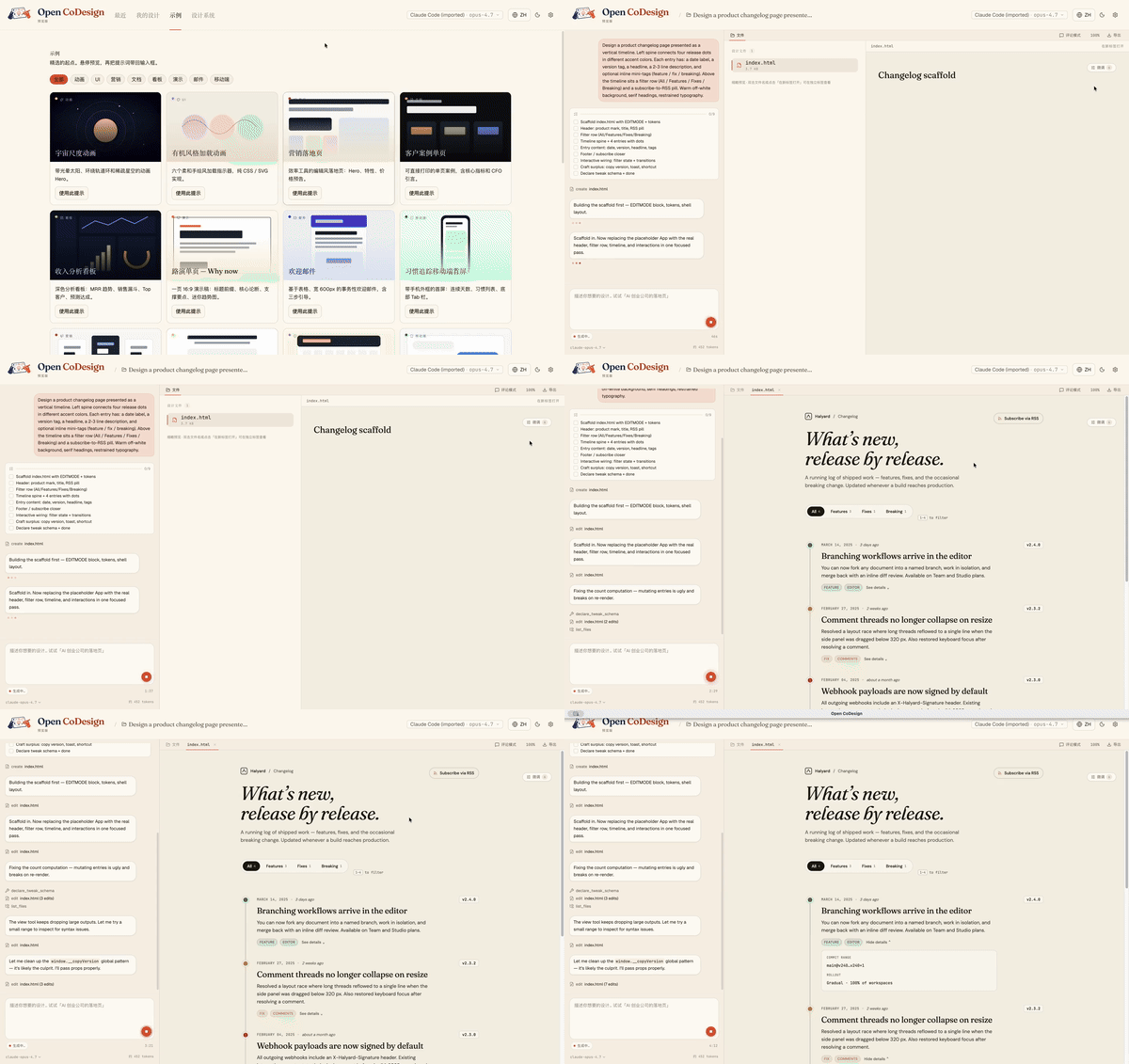
From a blank prompt to a finished artifact, the agent plans, writes, self-checks, and ships something with hover states, tabs, and empty states already wired up:
Why people star it
- Runs on your laptop — no mandatory cloud workspace
- Works with your model — Claude, GPT, Gemini, Ollama, OpenRouter, and more
- Exports real files — HTML, PDF, PPTX, ZIP, Markdown
- Shows its work — live agent activity, visible tool calls, interruptible generation
Why Open CoDesign?
Open source, desktop-native, and built for people who do not want their design workflow locked to one model or one cloud.
| Open CoDesign | Claude Design | v0 by Vercel | Lovable | |
|---|---|---|---|---|
| Open source | ✅ MIT | ❌ Closed | ❌ Closed | ❌ Closed |
| Desktop native | ✅ Electron | ❌ Web only | ❌ Web only | ❌ Web only |
| Bring your own key | ✅ Any provider | ❌ Anthropic only | ❌ Vercel only | ⚠️ Limited |
| Local / offline | ✅ Fully local app | ❌ Cloud | ❌ Cloud | ❌ Cloud |
| Models | ✅ 20+ (Claude, GPT, Gemini, Ollama…) | Claude only | GPT-4o | Multi-LLM |
| Version history | ✅ Local sessions + workspace files | ❌ | ❌ | ❌ |
| Data privacy | ✅ On-device app state | ❌ Cloud-processed | ❌ Cloud | ❌ Cloud |
| Editable export | ✅ HTML, PDF, PPTX, ZIP, Markdown | ⚠️ Limited | ⚠️ Limited | ⚠️ Limited |
| Price | ✅ Free app, provider/subscription cost only | 💳 Subscription | 💳 Subscription | 💳 Subscription |
Highlights
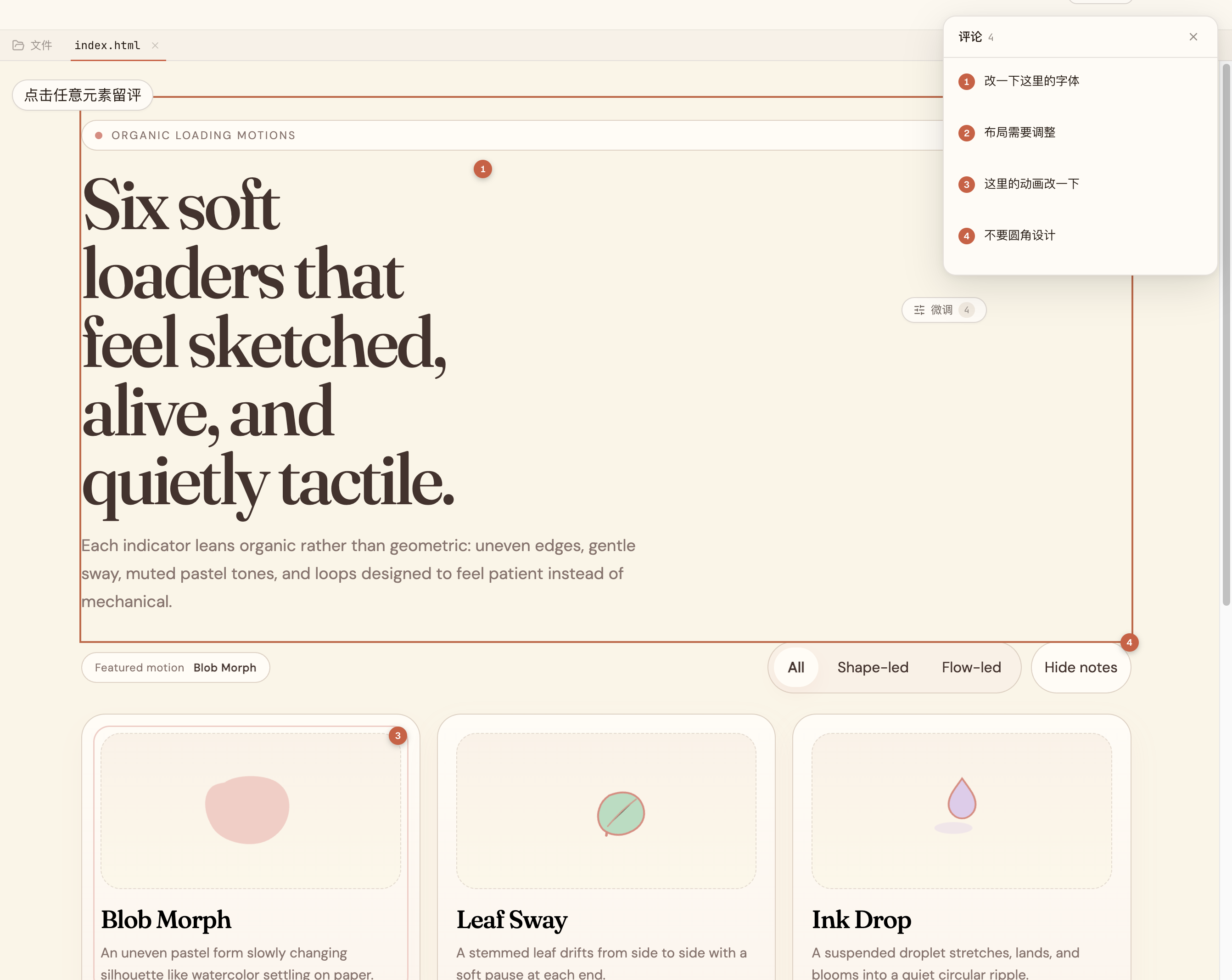
Comment, don’t retype. |
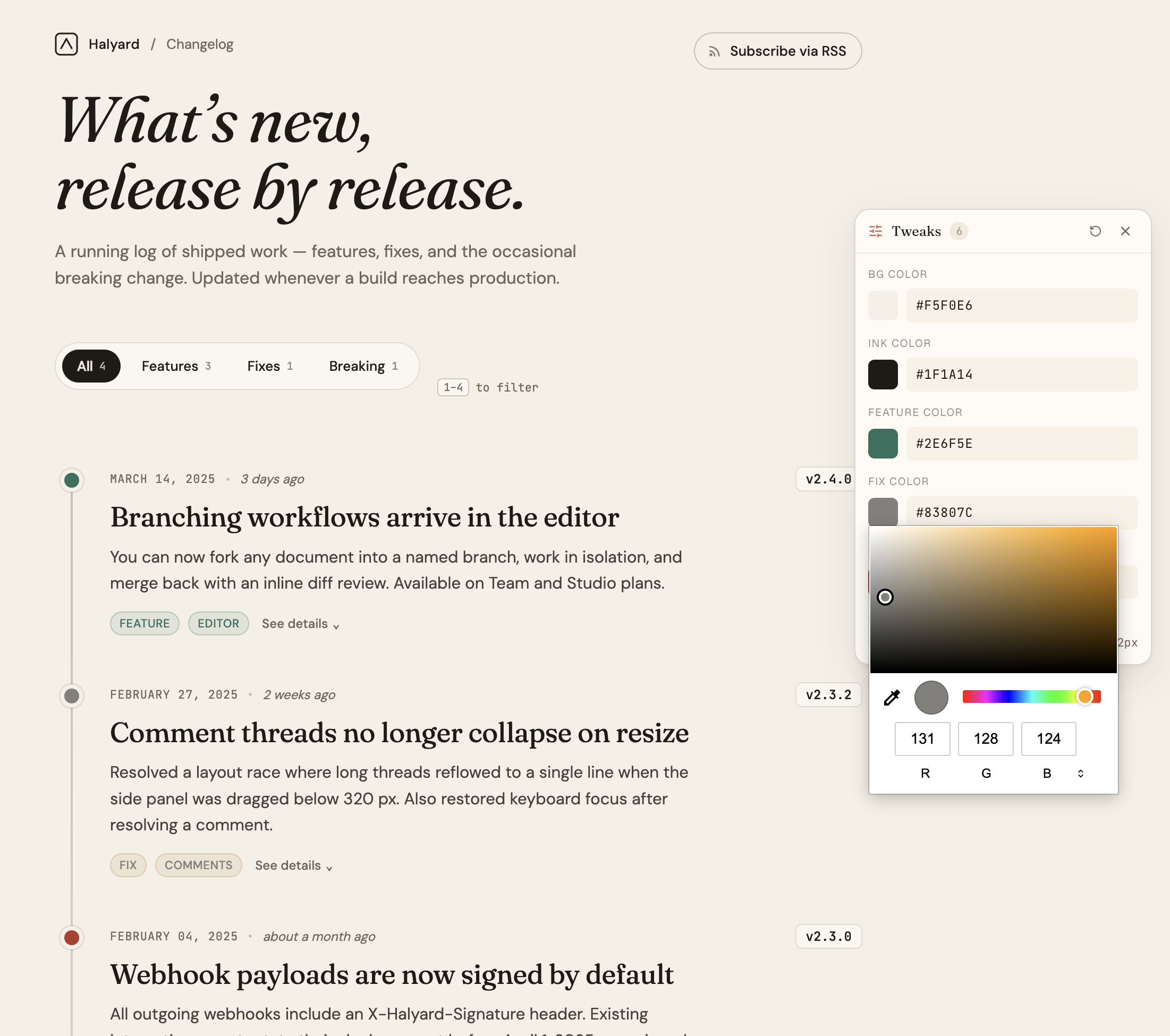
AI-tuned sliders. |
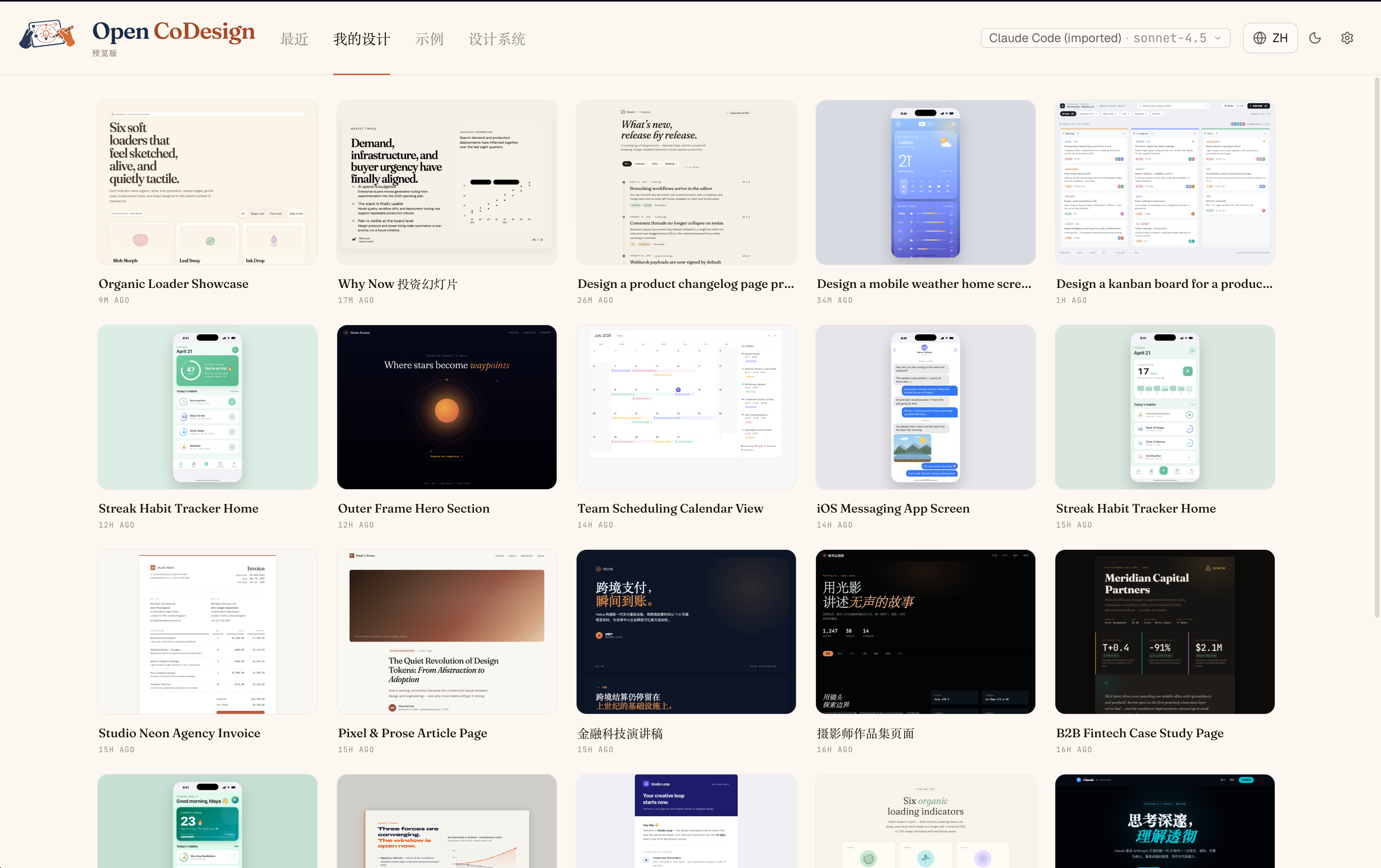
Every iteration, kept. |
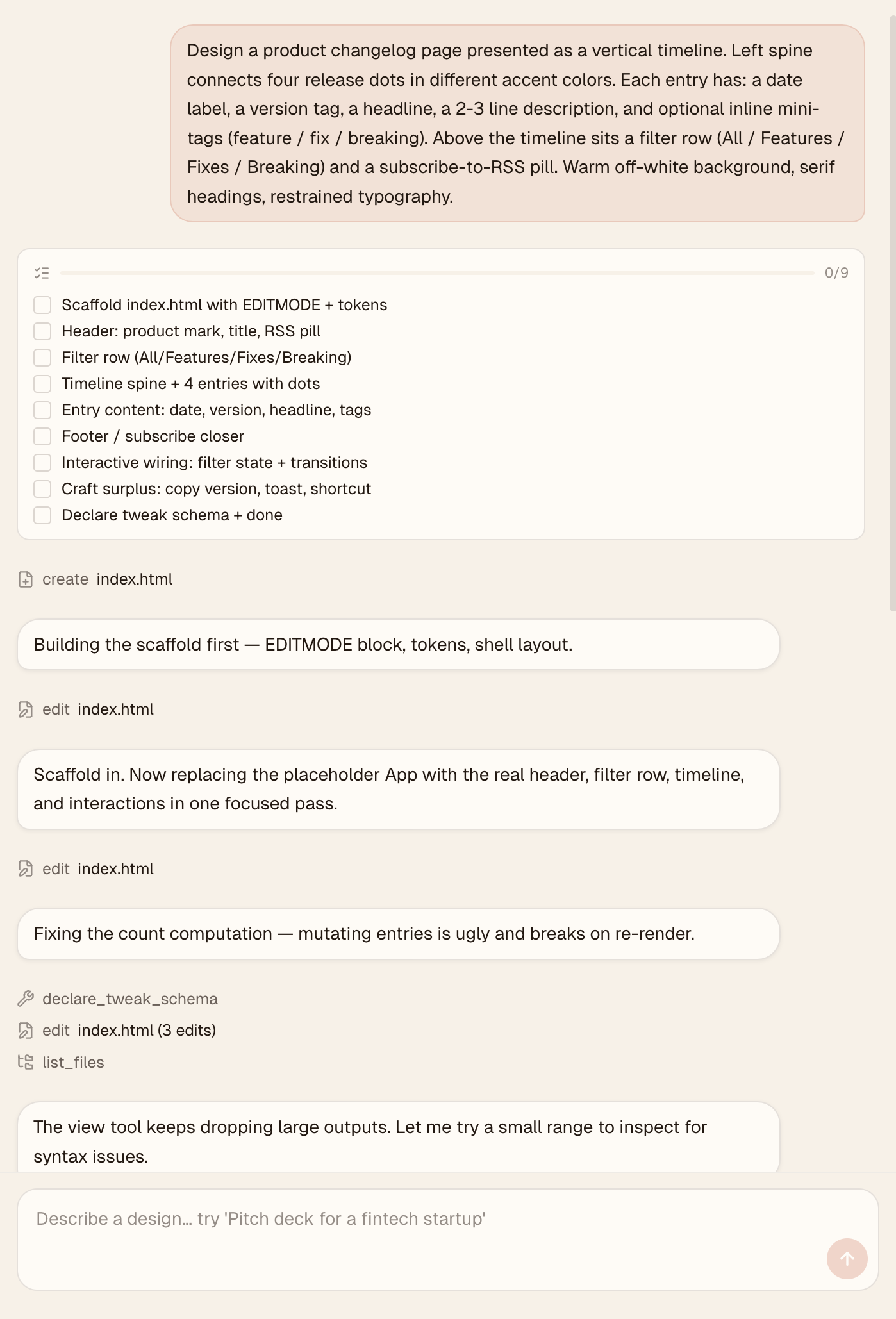
Watch the agent work. |
Quickstart
Time to first artifact: about 3 minutes
Requires: one API key, ChatGPT subscription sign-in, or local Ollama
Runs on: macOS 12+ (Monterey or later), Windows 10+, Linux (glibc ≥ 2.31)
1. Install
Package manager (recommended):
# macOS
brew install --cask opencoworkai/tap/open-codesign

# Windows — Scoop
scoop bucket add opencoworkai https://github.com/OpenCoworkAI/scoop-bucket
scoop install opencoworkai/open-codesign
Or direct download from the v0.2.0 GitHub Release:
| Platform | File |
|---|---|
| macOS (Apple Silicon) | open-codesign-*-arm64.dmg |
| macOS (Intel) | open-codesign-*-x64.dmg |
| Windows (x64) | open-codesign-*-x64-setup.exe |
| Windows (ARM64) | open-codesign-*-arm64-setup.exe |
| Linux (x64, AppImage) | open-codesign-*-x64.AppImage |
| Linux (x64, Debian/Ubuntu) | open-codesign-*-x64.deb |
| Linux (x64, Fedora/RHEL) | open-codesign-*-x64.rpm |
Each release ships with SHA256SUMS.txt and a CycloneDX SBOM (*-sbom.cdx.json) so you can verify what you downloaded.
More package managers
| Manager | Command | Status |
|---|---|---|
| Homebrew Cask (macOS) | brew install --cask opencoworkai/tap/open-codesign | 🟢 Live |
| Scoop (Windows) | scoop bucket add opencoworkai https://github.com/OpenCoworkAI/scoop-bucket && scoop install opencoworkai/open-codesign | 🟢 Live |
| winget (Windows) | winget install OpenCoworkAI.OpenCoDesign | 🟡 PR submitted; waiting for Microsoft review |
| Flathub (Linux) | flatpak install flathub ai.opencowork.codesign | ⏸ Deferred; needs signed build + AppStream metadata |
| Snap (Linux) | snap install --dangerous open-codesign-*.snap | 🟡 Attached to releases best-effort; Snap Store publish not yet wired |
After each stable tag push, CI syncs SHAs back into packaging/ and publishes downstream Homebrew/Scoop updates when the repo secrets are configured. The first winget submission is in review; once Microsoft accepts the package, future winget bumps can be automated from the release workflow. Every packaging/*/README.md documents its own channel.
Unsigned installer note: installers are not notarized or Authenticode-signed yet. On macOS Sequoia 15+ right-click → Open no longer bypasses Gatekeeper, and "Open Anyway" in System Settings often fails. Reliable one-liner:
xattr -cr "/Applications/Open CoDesign.app"Then double-click normally. (Older 0.1.x builds are installed as
/Applications/open-codesign.app.) On Windows: SmartScreen → More info → Run anyway.Want a verified build? Compile from source — see CONTRIBUTING.md.
2. Add a provider
On first launch, Open CoDesign opens the Settings page. Pick the path that matches how you already use models:
- ChatGPT subscription — sign in with ChatGPT to use Codex models without pasting an API key.
- API key — paste Anthropic (
sk-ant-...), OpenAI (sk-...), Google Gemini, OpenRouter, SiliconFlow, DeepSeek, or another supported provider key. - Local / keyless — use Ollama or an IP-allowlisted OpenAI-compatible gateway.
Credentials stay in ~/.config/open-codesign/config.toml and the ChatGPT OAuth token store under the app config directory. Nothing leaves your machine unless your chosen model route requires it.
3. Type your first prompt
Pick one of fifteen built-in demos — landing page, dashboard, pitch slide, pricing, mobile app, chat UI, event calendar, blog article, receipt/invoice, portfolio, settings panel, and more — or describe your own. A sandboxed prototype appears in seconds.
Bring your stack
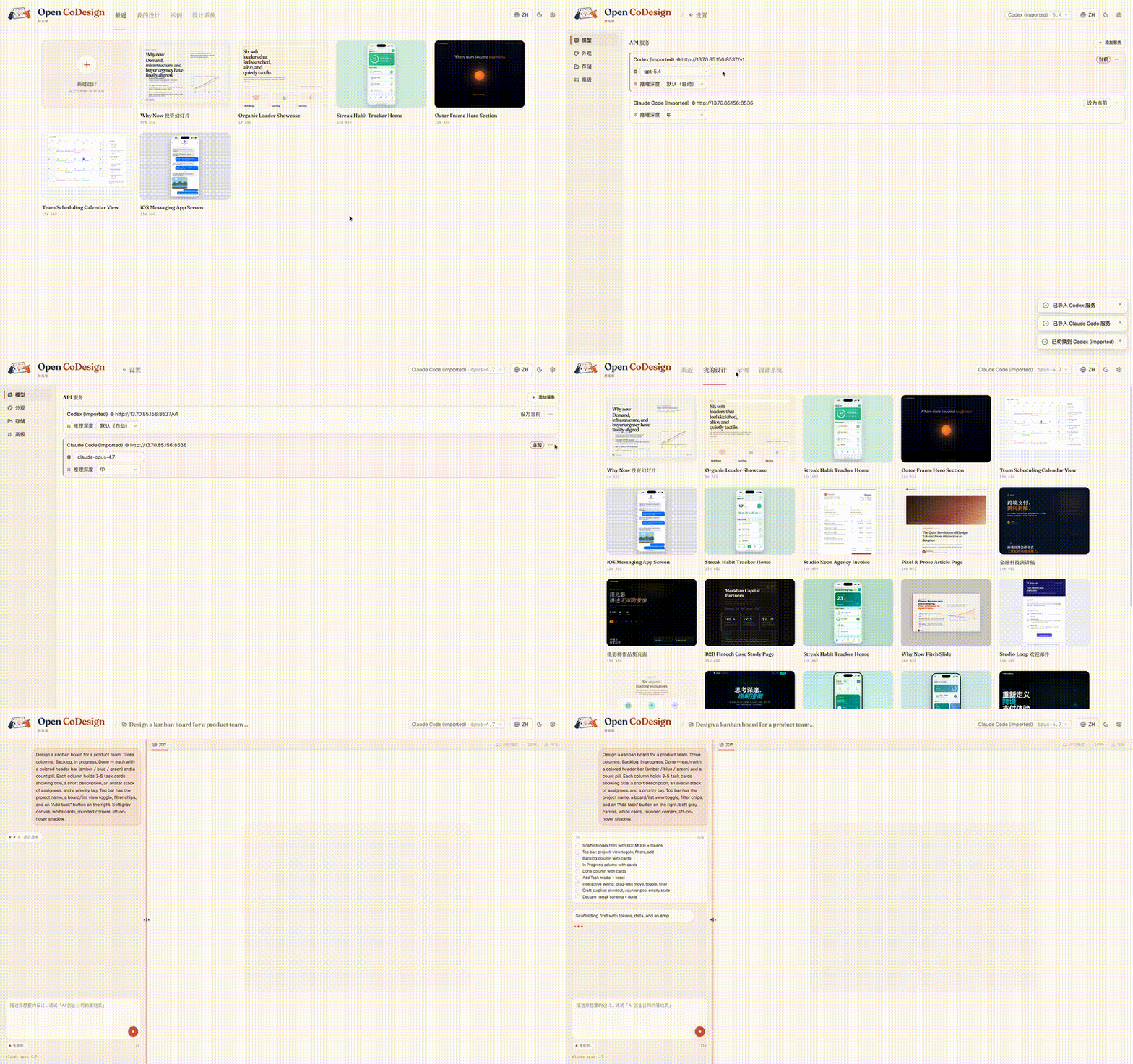
Already using Claude Code or Codex? API-key provider configs import in one click, with no copy-paste and no need to re-enter settings. If you use Codex through ChatGPT subscription login, sign in directly from Settings:
Built-in taste
Generic AI tools tend to produce generic output. Open CoDesign ships with twelve built-in design skill modules — slide decks, dashboards, landing pages, SVG charts, glassmorphism, editorial typography, heroes, pricing, footers, chat UIs, data tables, and calendars — plus a built-in taste layer that steers the model toward considered typography, purposeful whitespace, and meaningful color.
Every skill is available in every generation. Before the model writes a line of CSS, it selects the skills that fit the brief and reasons through layout intent, design-system coherence, and contrast, bringing higher-quality design behavior to whichever model you choose.
Add a SKILL.md to any project to teach the model your own taste.
What you get
Models and providers
- Unified provider model — Anthropic, OpenAI, Gemini, DeepSeek, OpenRouter, SiliconFlow, local Ollama, or any OpenAI-compatible relay; keyless (IP-allowlisted) proxies supported
- One-click import and sign-in — bring Claude Code / Codex API-key provider configs across, or sign in with ChatGPT subscription for Codex models
- Dynamic model picker — every provider exposes its real model catalogue, not a hardcoded shortlist
Generation and editing
-
Prompt → HTML or JSX/React component prototype, rendered in a sandboxed iframe (vendored React 18 + Babel on-device)
-
Fifteen built-in demos + twelve design skill modules — ready-to-edit starting points for common design briefs
-
Live agent panel — watch tool calls stream in real time as the model edits files
-
AI image generation — opt-in bitmap assets for heroes, product shots, backgrounds, and illustrations via OpenAI, OpenRouter, or signed-in ChatGPT subscription
-
AI-generated sliders — the model emits the parameters worth tweaking (color, spacing, font)
-
Comment mode — click any element in the preview to drop a pin, leave a note, and let the model rewrite only that region
-
Decompose to UI Kit — one click in the chat sidebar emits a
ui_kits/<slug>/folder (index.html+components/*.tsx+tokens.css+manifest.json+README.md) shaped for coding-agent handoff. Built-in deterministic + vision verifiers self-check parity using a 12-question boolean rubric (no floating-point arbitrary scores) and re-iterate on gaps. Per-decompose cost surfaces inline as a toast. See BENCHMARKS.md.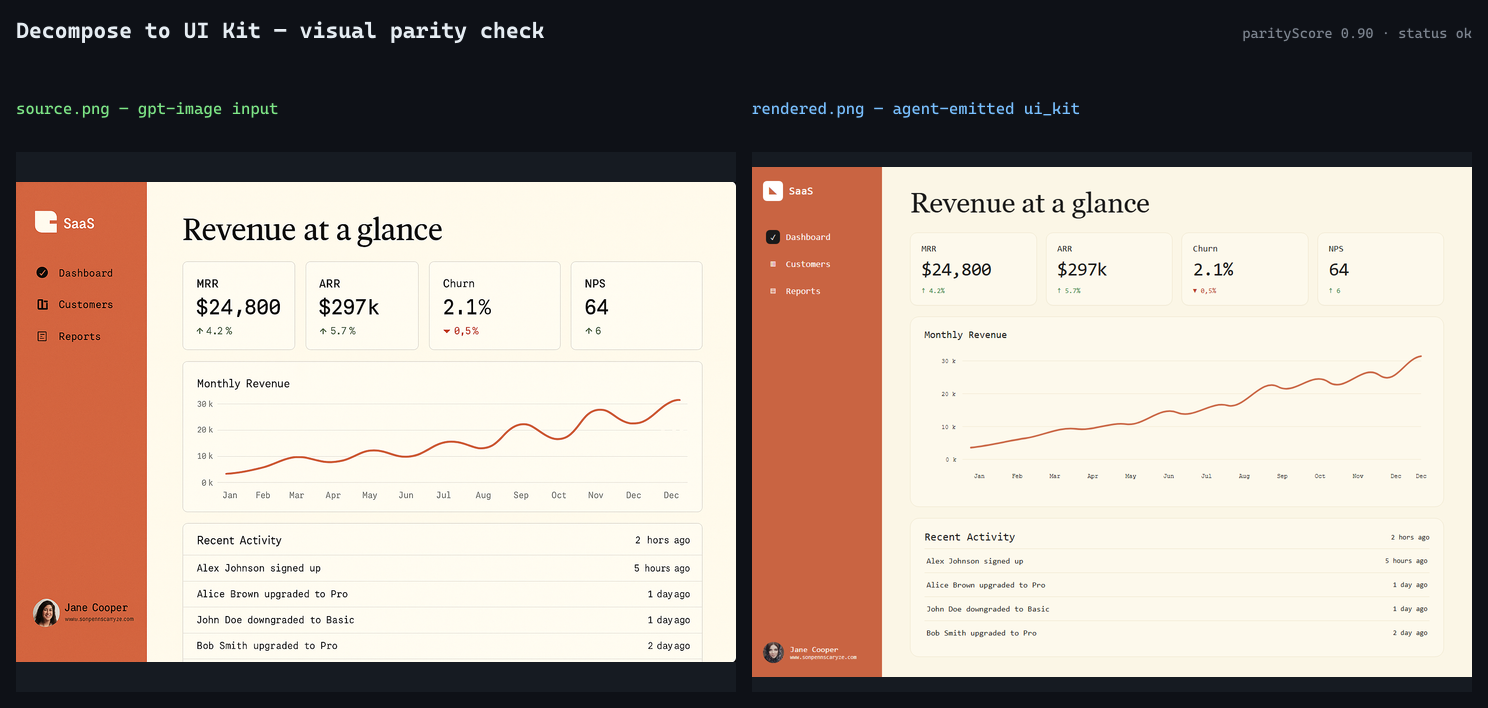 Source image (gpt-image input) on the left, agent-emitted
 ui_kitrendered headlessly on the right. Parity score and status are derived deterministically —parityScore = passCount / totalChecks— from the 12-check boolean rubric. Numbers are from a reale2e-opus-finalrun, not a mock.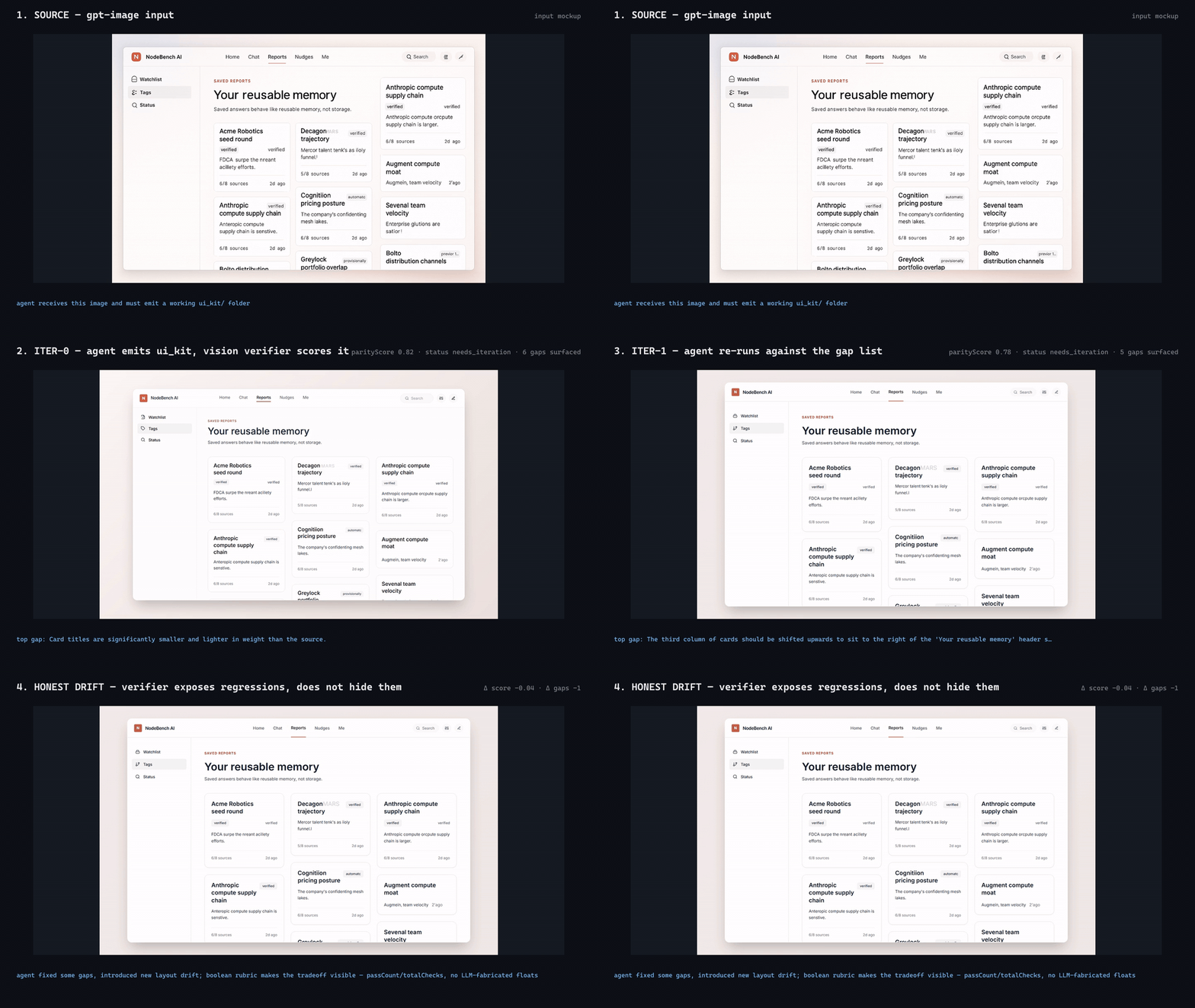 4-frame reel from the
 e2e-nodebench-iterrun: source → iter-0 (parityScore 0.82, 6 gaps) → iter-1 (parityScore 0.78, 5 gaps) → honest verdict. The agent fixed some gaps and introduced new layout drift; the boolean rubric exposes the regression instead of hiding it. MP4 version. -
Generation cancellation — stop mid-stream without losing prior turns
Preview and workflow
- Phone / tablet / desktop preview — true responsive frames, switch with one click
- Files panel — inspect multi-file artifacts (HTML, CSS, JS) before export
- Instant design switching — the last five designs keep their preview iframes alive, so Hub ↔ Workspace and sidebar navigation stay zero-delay
- Connection diagnostic panel — one-click test for any provider, with actionable errors
- Per-generation token counter — see exactly how many tokens each run cost in the sidebar
- Settings with four tabs — Models, Appearance, Storage, and Advanced
- Light + dark themes, EN + 简体中文 UI with live toggle
Export and packaging
- Five export formats — HTML (inlined CSS), PDF (local Chrome), PPTX, ZIP, Markdown
- GitHub Release pipeline — unsigned DMG (macOS), EXE (Windows), AppImage (Linux). Code-signing lands in v0.5 along with opt-in auto-update
Roadmap
Current release: v0.2.0. The current release theme is Agentic Design.
Now — v0.2.0 shipped
v0.2 turns Open CoDesign from a one-shot generator into a local design agent with a real workspace:
- Design as session — every design is a pi session with JSONL history and a workspace folder on disk
- Permissioned agent loop — pi built-ins for read, write, edit, bash, grep, find, and ls, gated by Open CoDesign's permission UI
- Design tools on demand —
ask,scaffold,skill,preview,gen_image,tweaks,todos, anddone DESIGN.mdas shared memory — brand tokens and design-system decisions become editable files, not model memory- v0.1 migration path — existing SQLite designs migrate into workspaces and session history
Previous — v0.1.4
- AI image generation — opt-in bitmap assets through OpenAI image models or OpenRouter image models
- ChatGPT Plus / Codex subscription login — one-click OAuth for users who do not want to paste an API key
- CLIProxyAPI one-click import — auto-detect a running local proxy and bring it into Settings
- API config hardening — clearer relay diagnostics for timeouts, SSE truncation, missing
/models, and incompatible Messages APIs
Later — v0.2.x and beyond
- Renderer polish for the new
ask,preview, tweaks, and process-management surfaces - Cost transparency — pre-generation estimate + weekly budget (per-generation token count already shipped)
- Version snapshots + side-by-side diff
- Three-style parallel exploration
- Codebase → design system (token extraction)
- Code-signing (Apple ID + Authenticode) + opt-in auto-update — v0.5
- Figma layer export — post-1.0
Have a different priority in mind? Open an issue or 👍 an existing one — we do read them.
Star History
Built on
- Electron + React 19 + Vite 6 + Tailwind v4
@mariozechner/pi-aiandpi-coding-agent(model/provider and agent-loop primitives)electron-builder
Reporting issues
Found a bug or have a feature request?
- Search existing issues first.
- Generate a diagnostics bundle — Settings → Storage → Export diagnostics (API keys and prompts are redacted automatically).
- Open a new issue using our bug report or feature request template.
- For security vulnerabilities, see SECURITY.md.
More from OpenCoworkAI
If you like Open CoDesign, you may also want to check out our earlier project, Open Cowork, an open-source AI agent desktop app for Windows and macOS with one-click install, multi-model support, sandbox isolation, and built-in skills.
Community
Open CoDesign first launched on the LINUX DO community — thanks to everyone there for the early feedback and discussion.
- GitHub Discussions — share your designs in Show & Tell, ask questions in Q&A, and propose features in Ideas.
- LINUX DO — Chinese-speaking discussion, use tips, and feedback (primary community).
- GitHub Issues — bug reports and reproducible problems.
WeChat group
For Chinese-speaking users, we also keep a WeChat group for product updates, usage questions, and community discussion.
⚠️ The WeChat QR code rotates every 7 days and is currently valid until May 16. If the code has expired, please leave a message in GitHub Issues and we will refresh the image in-repo.
See also the Chinese README: README.zh-CN.md#社群.
Contributing
Read CONTRIBUTING.md. Open an issue before writing code and run pnpm lint && pnpm typecheck && pnpm test before a PR.
License
MIT — fork it, ship it, sell it. Third-party notices remain in NOTICE.
Cite this project
If you reference Open CoDesign in a paper, article, or product comparison, please cite the repository as:
@misc{open_codesign_github,
  author       = {OpenCoworkAI Contributors},
  title        = {Open CoDesign: An Open-Source Desktop AI Design Tool},
  year         = {2026},
  howpublished = {\url{https://github.com/OpenCoworkAI/open-codesign}},
  note         = {GitHub repository}
}
Or the machine-readable CITATION.cff at the repo root.